


Everything you need to prepare print-ready artwork for your Handwrytten custom cards — in one place.
Handwrytten card design specifications are the technical foundation of every successful custom card print job — and getting them right before submitting artwork saves time, avoids reprints, and ensures every card looks exactly as intended. This page covers the complete card design specifications for all Handwrytten card sizes and orientations, including bleed, safe zone, clear space, color, resolution, and file format guidance drawn directly from the current Card Customizer Quick Guide.
If you need help preparing your artwork or don’t have access to a design program, Handwrytten’s design team is available to help. Visit our Custom Card Design Services page to learn more. For a walkthrough of how to upload and send your custom design through the card customizer, visit our Guide to Creating and Sending Custom Designs.
These card design specifications apply to all card sizes and orientations.
Resolution: 300 PPI (pixels per inch). Use high-resolution JPEGs or PNGs for sharp, clean print results. Low-resolution files will print soft or pixelated.
Bleed: 0.25″ on all edges. Artwork must extend to the bleed line to avoid white edges after trimming. See individual card specs below for bleed dimensions.
Safe Zone: Keep all logos, text, and important design elements within the safe zone — 0.375″ from the bleed line, or 0.25″ from the card edge. Anything outside the safe zone risks being trimmed.
Color Space: CMYK only. Handwrytten does not print in RGB or Pantone. Files submitted in RGB will be converted, which may cause color shifts. Build your files in CMYK from the start for accurate results.
File Format: High-resolution JPEG or PNG when uploading through the card customizer. If submitting files directly to the design team, PDF or native design files (AI, PSD, INDD) with all links embedded and text outlined are accepted.
Printer Marks: Do not include trim marks, registration marks, color bars, or file names in your submitted file. Upload only the artwork you want printed.
Clear space is a required area on the writing side of every card — a zone that must remain entirely free of all printing, graphics, text, color, and finishes. This area is reserved for the robotic writing instrument and must be completely blank to ensure the handwritten message can be written cleanly.
Clear space size and location vary by card size and orientation. Reference the table below:
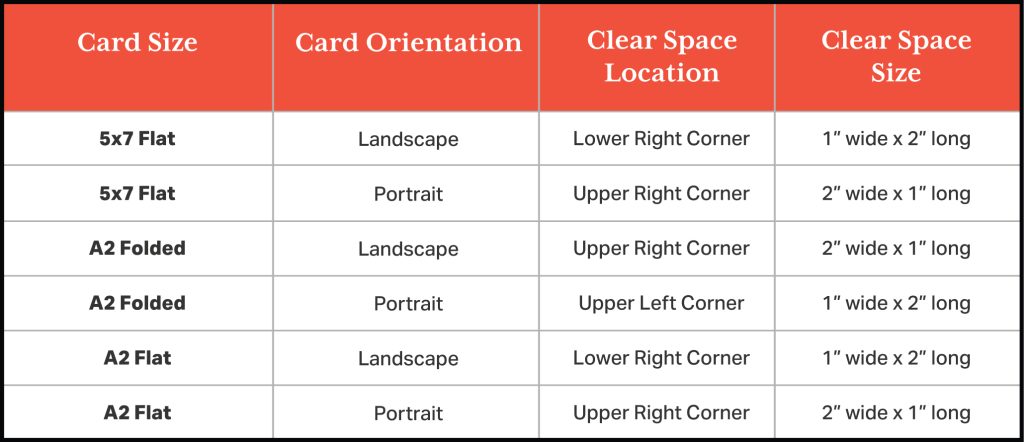
The clear space area is shown on all downloadable templates. If you are adding a header, footer, or design elements to the writing side of your card, keep all artwork outside of the clear space area.
The writing side of your card is where the Handwrytten robot writes the message. The following card design specifications apply specifically to the writing side of every card format.
Leave adequate space. The more space you leave on the writing side, the longer the handwritten message can be. Design elements that crowd the writing area will result in shorter messages.
Keep the writing area free of color and graphics. Leave the area where the robot will write completely blank — no background color, no pattern, no graphics. A clean white or off-white surface produces the best results.
Headers and footers are welcome. You can include a branded header at the top and a footer at the bottom of the writing side — just leave the main writing area in the center free and clear.
Keep important elements within the safe zone. Any text or logos on the writing side should stay well within the safe zone to avoid edge trimming.
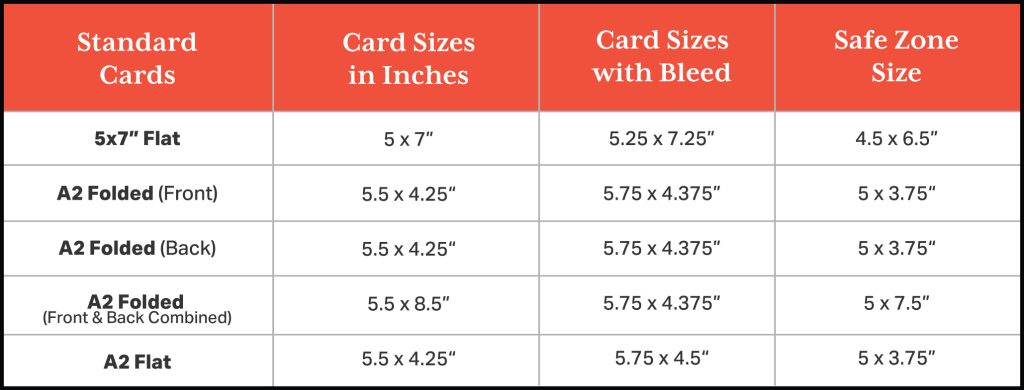
The following card design specifications apply to the 5×7″ flat card in both landscape and portrait orientations.
The 5×7″ flat card is available in landscape (7×5″) and portrait (5×7″) formats.
Front: Artwork only. This is not the writing side.
Back: The writing side. Artwork is optional — leave adequate space for the handwritten message. Keep the clear space area completely blank.
Downloadable templates — 5×7″ Flat:
5×7″ Landscape (Flat):
InDesign | Illustrator | Photoshop
7×5″ Portrait (Flat):
InDesign | Illustrator | Photoshop
The following card design specifications apply to the A2 folded card in both landscape and portrait orientations.
The A2 folded card folds to 4.25″ x 5.5″ and is available in landscape and portrait formats. The front and back images must be uploaded as separate files when using the card customizer.
Front: Artwork only. Note that the front artwork must be flipped upside down when preparing your file so it reads correctly when the card is folded. Templates include orientation guidance.
Back: Optional artwork. The back is the outer back panel of the folded card.
Inside: The writing side. Artwork is optional — leave adequate space for the handwritten message. Keep the clear space area completely blank
Downloadable templates — A2 Folded:
A2 Landscape (Folded):
InDesign | Illustrator | Photoshop
A2 Portrait (Folded):
InDesign | Illustrator | Photoshop
The following card design specifications apply to the A2 flat card in both landscape and portrait orientations.
The A2 flat card is a smaller flat format available in landscape and portrait orientations.
Front: Artwork only. This is not the writing side.
Back: The writing side. Artwork is optional — leave adequate space for the handwritten message. Keep the clear space area completely blank.
Downloadable templates — A2 Flat:
A2 Landscape (Flat):
InDesign | Illustrator | Photoshop
A2 Portrait (Flat):
InDesign | Illustrator | Photoshop
All Handwrytten cards are mailed in white envelopes. Custom printed envelopes are available — contact the Handwrytten team before submitting envelope artwork for sizing requirements and a quote.
The most common card design specifications errors that cause print issues are almost entirely avoidable with the right file preparation. Here are the ones to watch for:
Submitting files in RGB. All files should be built in CMYK. RGB files will be converted before printing, which can cause color shifts — particularly in blues, greens, and purples.
Missing bleed. Artwork that doesn’t extend to the bleed line risks white edges after trimming. Extend all background colors and edge-to-edge design elements fully to the bleed line.
Text or logos outside the safe zone. Anything outside the safe zone may be clipped during trimming. Keep all critical design elements well within the safe zone boundaries.
Color or graphics in the clear space area. The clear space must be completely blank — no color, no pattern, no graphics of any kind. Any printing in the clear space will interfere with the handwritten message.
Low-resolution images. Files below 300 PPI will print soft or pixelated. Always start with high-resolution source files.
Including printer marks. Trim lines, registration marks, and color bars should not be included in submitted files. Templates handle all technical marks — upload only your artwork.
Submitting front and back as a single file for folded cards. The card customizer requires front and back images as separate files for folded card formats.
All Handwrytten templates include bleed lines, trim or card edge, safe zone, and clear space indicators and are available in Illustrator, Photoshop, and InDesign formats. Download the template for your card size and orientation before building your artwork to ensure your card design specifications are met from the start.
A2 Folded — Landscape:
InDesign | Illustrator | Photoshop
A2 Folded — Portrait:
InDesign | Illustrator | Photoshop
A2 Flat — Landscape:
InDesign | Illustrator | Photoshop
A2 Flat — Portrait:
InDesign | Illustrator | Photoshop
5×7″ Flat — Landscape:
InDesign | Illustrator | Photoshop
7×5″ Flat — Portrait:
InDesign | Illustrator | Photoshop
For a visual reference of all card sizes, bleed lines, trim lines, safe zones, and clear space locations, download the complete Card Customizer Quick Guide (PDF).
What file format should I submit for custom card artwork?
High-resolution JPEGs or PNGs (300 PPI) are required for uploads through the card customizer. If submitting files directly to the design team, PDF or native design files (AI, PSD, INDD) with all links embedded and text outlined are accepted. Review the general card design specifications above for the full list of file requirements before submitting.
What is the difference between bleed, safe zone, and clear space in card design specifications?
These are three distinct technical zones in Handwrytten’s card design specifications. Bleed is the area beyond the card edge that gets trimmed — artwork must extend to the bleed line to avoid white edges. Safe zone is the area where all important design elements should stay to avoid being trimmed. Clear space is a specific required blank area on the writing side reserved for the handwritten message — it must remain entirely free of all printing, graphics, text, and color.
Can I include design elements on the writing side of the card?
Yes — headers, footers, and background elements are all options on the writing side, as long as the clear space area remains completely blank and enough room is left for the handwritten message. The more writing area you leave, the longer the message can be. See the writing side card design specifications above for full guidance.
What if I need a card size not covered by these card design specifications?
Custom card sizes outside the standard lineup may be available. Contact the Handwrytten team at sales@handwrytten.com for sizing options and a custom quote.
Can I use Pantone colors in my artwork?
No — Handwrytten prints in CMYK only. Convert all Pantone colors to CMYK equivalents before submitting your artwork. Note that CMYK conversions of Pantone colors may shift slightly in appearance — particularly for bright, saturated colors.
For a complete visual reference of all card dimensions, bleed lines, trim lines, safe zones, and clear space areas, download the Card Customizer Quick Guide (PDF).
For design help, visit Custom Card Design Services or contact sales@handwrytten.com.
Editor’s note: This article was revised in July 2026


Scale your handwritten outreach, creating positive impressions and long lasting bond.
Sign Up Today!


Over 100 designs to choose from or design your own. Our online card customizer makes it simple.
Check Out Our Cards!




Thank you.
